
STARTFour things to know before you play
These terms appear throughout the game. Learn them first, and the cards and rules will be much easier to understand.
Your score
VP only counts while the card is in your ecosystem.
Your spending money
Use RP to play cards and pay Action costs.
Your ocean's base
Coral and Creature Schools help support what you can play.
The creatures you play
Fish, Predators, Apex, Invertebrates, and Filter Feeders.
01How to win
Build an ecosystem whose cards add up to the agreed Victory Point target. Protecting your points matters as much as gaining them.
The winning rule
Be the first player to reach the target with VP currently in play.
10 VP
Best for a first or quick game
30 VP
Recommended full game
VP can go back down
If a VP card leaves your ecosystem—or a conditional VP requirement stops being true—subtract those points.
The deck-out loss
If you must draw and both of your personal decks are depleted, you lose.
02Set up the table
Each player’s 60 cards become two personal decks. The Conditions Deck is separate and shared by everyone.
Foundation Deck
Coral, Creature Schools, and their stages
Main Deck
Creatures, Support cards, and Habitat cards
Conditions Deck
One separate shared deck; affects everybody
Simple table map
Bring to the table
- One legal deck per player, separated into two piles
- One shared Conditions Deck
- RP counters plus damage or HP counters
- D4, D6, D8, D10, D12, and D20 dice as cards require
Opening setup, in order
- 1Draw 4 cards from your Foundation Deck.
- 2Draw 4 cards from your Main Deck. You now have 8 cards.
- 3Place 3 RP in your RP bank.
- 4Spend setup RP to play a valid base Foundation.
- 5If your Foundation hand cannot play one, redraw that Foundation hand.
- 6Once everyone has a starting Foundation, begin round one.
For a first game: use a Base Coral or base Creature School as the starting Foundation, and choose the first player by agreement. The current rules do not prescribe a first-player method.
03Take a turn: Choose, Collect, Build, Attack
Say the four words out loud for the first few turns. The rhythm becomes automatic quickly.
- 1
Choose
Which deck helps me most?
Draw 1 card from either your Foundation Deck or your Main Deck. You do not draw from both unless a card effect says so.
- 2
Collect
How much RP do I gain?
Gain 1 RP, then add the RP produced by your active Foundations. Apply modifiers and discard RP above your current bank cap.
- 3
Build
What can I add to my ocean?
Spend RP to play legal cards, upgrade Foundations, and use paid Actions. A card's Actions are available the turn it enters your ecosystem unless its text says otherwise. Meet every requirement before paying the cost.
- 4
Attack
What can my Pals target?
Use available attacks one at a time. Choose a legal target and completely resolve that attack before beginning another.
Playing in the simulator?
The canonical rule order is Choose → Collect → Build → Attack. The simulator currently automates collection before it presents the deck-choice prompt; it is handling those start-of-turn jobs for you.
04Play the first round together
A round starts with one shared Condition. Then each player takes a complete turn.
Start of round: reveal a Condition
Read it aloud and apply its printed effect to everyone for the stated duration.
The table-talk script
- 1. “Which deck are you choosing?”
- 2. “Add 1 RP. What do your Foundations produce?”
- 3. “What can you afford, and where can it legally go?”
- 4. “Does one of your cards have a legal attack?”
Pause only for these checks
- Can the player pay the full RP and additional cost?
- Does the Pal match its habitat and legal space?
- Does the attack icon allow that target?
- Did the current Condition change the rule?
You now know enough to start.
Use the sections below only when the game asks for them.
05Read a card without reading every word
Start with the corners and labels. Read the full rules box only when you are about to play or use the card.
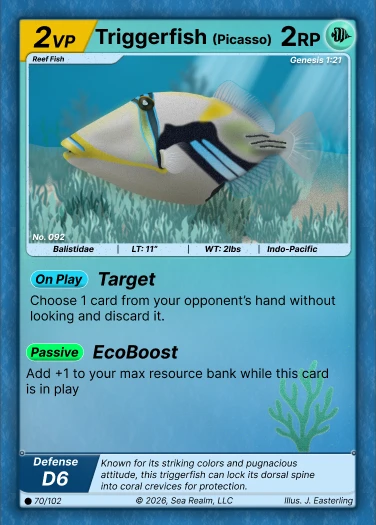
VP
Top-left score. It counts only while this card is in play.
Name, kind & habitat
Identify what the card is and whether it is Reef, Oceanic, or Deep.
RP cost
Top-right amount paid when the card is played.
Requirements
Checks that must already be true before you pay the cost.
Rules labels
Passive is ongoing, On Play happens once, and Action is chosen and paid.
Attack & Defense
The attack lists die, legal targets, and count; Defense is the opposing roll.
Four different labels answer four different questions
Card kind
Creature, Coral, Support, Habitat, or Condition
Habitat zone
Reef, Oceanic, or Deep
Creature class
Fish, Predator, Apex, Invertebrate, or Filter Feeder
Subtype
A narrower printed identity, such as Baitball
A Deep Predator and a Reef Predator share the Predator class, but their habitat zones are different. Both labels matter.
06Place cards: match habitat first, then class
A legal play must satisfy both checks unless specific card text creates an exception.
Check 1
Does the habitat match?
Reef creatures use compatible Reef slots. Deep creatures use compatible Deep slots. They do not cross between those habitats unless a printed rule says they can.
Check 2
Does the class fit?
A slot’s icon tells you the largest class it can hold. The hierarchy applies only inside the matching habitat.

Fish slot

Predator slot

Apex slot

Invertebrate slot

Filter Feeder slot

Oceanic creatures use open water
Non-school Oceanic creatures are not placed into Reef or Deep Coral slots. Creature Schools form the Oceanic Foundation and supply School Density; cards may also require an enabling Habitat such as Open Ocean.
Upgrading Coral
Have the next stage in hand, meet its requirement, and pay its RP cost. Place it over the current stage. Existing damage stays, and a Coral normally upgrades only once per turn.
07Attack and defend
Read the attack indicator from left to right: die, legal target icons, then attack count.
The attack indicator
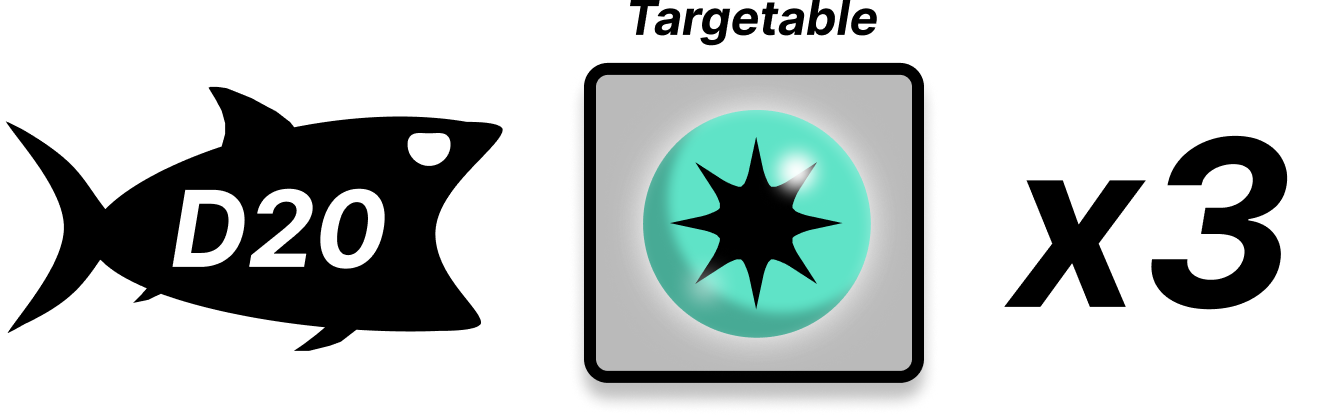
Die
D8 means roll an 8-sided die.
Targets
Every icon is a legal target family.
Count
×2 means two separate attacks.
Resolve a normal attack
- 1Choose a target allowed by the target icons and every printed restriction.
- 2Roll the printed attack die. The target rolls its Defense die.
- 3Apply valid + or − modifiers. A modified total cannot go below 0.
- 4The attacker succeeds only if its final total is higher. A tie goes to the defender.
- 5A successful normal attack destroys the defending creature unless an effect saves it. Put a destroyed Apex or Filter Feeder in its owner's Lost Zone; put other destroyed creatures in discard unless their text says otherwise.
Attack
7
>
Defense
5
Creature Schools take damage
They do not roll Defense. Damage equals the attack roll ×10. Discard the School when it reaches 0 HP.
Repeated attacks use distinct targets
Resolve each attack separately. During one repeated sequence, the same physical target cannot be selected twice.
Complete reference
Advanced rules and edge cases
This is the currently documented general rules layer. Open only the topic you need. A card’s more specific printed text wins when it clearly creates an exception.
Deck construction and card routing
60 cards, copy limits, printed VP, and which personal deck holds each card
Deck construction and card routing
60 cards, copy limits, printed VP, and which personal deck holds each card
- • A standard personal deck contains exactly 60 cards, no more than 4 copies of one card, at least one base Foundation, and at least 30 total printed VP.
- • “30 printed VP in your deck” is a construction rule. “30 current VP in play” is the recommended full-game win target.
- • Coral, Creature Schools, and their stages go in the Foundation Deck.
- • Regular creatures, Support cards, and playable Habitat cards go in the Main Deck.
- • Conditions use a separate shared deck and are not part of either player’s 60 cards.
Coral, Foundations, damage, and destruction
Upgrades preserve damage; weaknesses suppress production; VP leaves with the card
Coral, Foundations, damage, and destruction
Upgrades preserve damage; weaknesses suppress production; VP leaves with the card
- • Upgrade only to the next printed stage during Build. Meet its requirement, pay its RP cost, and place it over the current card.
- • Existing damage remains through an upgrade. The higher stage changes maximum HP as printed; it does not fully heal the Coral.
- • A Coral normally upgrades only once per turn.
- • When a Condition matches a Coral weakness, that Coral does not produce RP for the round. The weakness alone does not remove or damage it.
- • A destroyed Foundation leaves play for discard and its VP immediately stops counting.
- • The current knowledge base says occupants should move to compatible empty slots when possible. Because cleanup for creatures with no legal slot is not fully ruled, use the latest official ruling for that edge case.
Oceanic ecosystems and School Density
Creature Schools supply capacity; creatures commit it while in play
Oceanic ecosystems and School Density
Creature Schools supply capacity; creatures commit it while in play
- • Creature Schools are Oceanic Foundations with School Density and HP.
- • Add the School Density on your Creature Schools to find your total capacity. After reductions, each density-using creature commits its effective requirement while it remains in play, so those requirements add together.
- • Committed capacity becomes available again when that creature leaves. School Density is not permanently spent like RP: the capacity remains on the Creature School instead of leaving a bank.
- • If a Creature School leaves or changes and your commitments exceed the new capacity, keep the creatures already in play. You cannot play another creature with a positive School Density requirement until enough capacity is restored.
- • Non-school Oceanic creatures live in open water rather than Reef or Deep Coral slots. Obey any printed School Density and Habitat requirements.
- • Creature Schools do not roll Defense. An attack deals the attack roll ×10 as damage, and the School is discarded at 0 HP.
- • Oceanic Apex requirements are card-specific. Shortfin Mako, Sperm Whale, Pilot Whale, and Killer Whale require Open Ocean and 2 Oceanic Predators already in your ecosystem; those Predators stay in play. Bluefin Tuna requires Open Ocean, while Swordfish allows Open Ocean or Abyss.
- • Ocean Triggerfish's Territorial gives 1 chosen Creature School +30 HP while that Triggerfish remains in play. The choice is not transferable.
- • Thresher Shark requires 3 Oceanic Fish. Its Stun Strike adds +2 when the attack roll is 4 or higher; that bonus does not require Open Ocean.
- • Sardine Run and Krill Bloom can reduce the next qualifying School Density requirement once per player as printed.
Abilities, timing, and Support cards
Passive, On Play, Action, Special Rules, searching, and recovery
Abilities, timing, and Support cards
Passive, On Play, Action, Special Rules, searching, and recovery
- • A Passive is active while its card remains in play and its printed condition is true.
- • An On Play ability resolves when a card is successfully played. It does not repeat each turn.
- • An Action is chosen at its printed timing: pay its cost, choose legal targets, and resolve its instructions in order.
- • Special Rules has no universal effect. Apply the exact text on that card.
- • A Support normally resolves and goes to discard unless it explicitly remains in play.
- • Search the named deck or zone for a matching card, reveal or move it as instructed, and shuffle when required. Recovery moves an eligible card from discard to its stated destination.
- • Moving a physical card does not reset its identity or a once-per-turn use that belongs to it.
Lost Zone
Destroyed Apex and Filter Feeder cards do not enter the discard pile
Lost Zone
Destroyed Apex and Filter Feeder cards do not enter the discard pile
- • When an Apex or Filter Feeder is destroyed, place that physical card in its owner's Lost Zone instead of the discard pile.
- • A card in the Lost Zone is no longer in play, so its VP and in-play abilities stop applying immediately.
- • Lionfish has no Lost Zone instruction, so destroying it or discarding it with Spearfishing returns the Lionfish to its original owner's discard pile.
- • An Apex or Filter Feeder discarded as a cost, sacrifice, hand-limit overflow, or card effect goes to discard unless that instruction explicitly names the Lost Zone.
- • Other destroyed cards go to discard unless their own printed text gives them another destination.
Lionfish Invader
The host starts the trigger; the Lionfish owner determines target perspective
Lionfish Invader
The host starts the trigger; the Lionfish owner determines target perspective
- • Invader triggers at the start of the turn of the player whose ecosystem physically contains Lionfish.
- • Ownership does not change when Lionfish invades another ecosystem. Resolve “opponent” and “your own” from the Lionfish owner's perspective.
- • On heads, perform the D4-1 attack against a Fish controlled by the Lionfish owner's opponent, normally the ecosystem holder. On tails, attack another Fish controlled by the Lionfish owner.
- • The triggering Lionfish is not a legal target. Flip before choosing a target; if the rolled branch has no legal Fish, that attack fizzles and you do not switch branches.
Combat keywords and dice
Advantage, disadvantage, Toxic, Regenerate, Cloak, Transparency, and Massive
Combat keywords and dice
Advantage, disadvantage, Toxic, Regenerate, Cloak, Transparency, and Massive
- • D4, D6, D8, D10, D12, and D20 name dice with that many sides. Apply a written + or − after rolling; modified totals cannot fall below 0.
- • Advantage rolls twice and keeps the higher result. Disadvantage rolls twice and keeps the lower result.
- • Toxic When Eaten triggers only when a creature successfully consumes that Toxic card, unless explicit immunity or protection applies.
- • Regenerate is optional. After a successful attack, the controller may pay the printed RP to keep that creature in play.
- • Cloak does not make a creature untargetable; current Cloak cards grant their printed +3 Defense benefit.
- • Transparency checks the attack’s printed die size, not the modified result.
- • Massive is not identical on every card. Read whether that card changes the attack roll or Defense roll.
Habitats, hosted cards, and continuous HP
Persistent Habitats, attachments, capacity, and health bonuses
Habitats, hosted cards, and continuous HP
Persistent Habitats, attachments, capacity, and health bonuses
- • Habitat cards are played from the Main Deck and remain as independent cards in the ecosystem. Each physical copy tracks its own HP and effects.
- • Every current Habitat has 40 HP. Check each copy at the end of its controller's turn; a copy whose full composition is not met takes 10 HP of damage and is destroyed at 0 HP.
- • Coral Reef requires 4 Reef Corals, 2 Reef Fish, and 2 Reef Invertebrates.
- • Open Ocean requires 4 Creature Schools, 2 Oceanic Fish, and 2 Oceanic Invertebrates.
- • Abyss requires 4 Deep Corals, 2 Deep Fish, and 2 Deep Invertebrates.
- • Open Ocean and Abyss enable their related strategies. Deep-targeting restrictions still apply; a similar tag does not make a Reef creature Deep.
- • Hosted or attached cards are legal only when printed text permits the host, tag, and capacity. The hosted card keeps its own physical identity.
- • A hosted card moves with its primary host only when the applicable rule says it does.
- • Continuous HP bonuses raise current and maximum HP while active without erasing damage. Removing the bonus reduces both; a card at 0 HP is destroyed.
Conditions, limits, and overflow
Shared round effects, the RP cap, hand limits, and mandatory draws
Conditions, limits, and overflow
Shared round effects, the RP cap, hand limits, and mandatory draws
- • Reveal and apply a shared Condition at the start of each round. Read its printed duration; some effects last for the round and some are persistent until used.
- • Conditions can prevent card types from being played, change RP costs or bank caps, add draws, set a hand limit, suppress Coral RP, or reduce School Density requirements.
- • The default RP bank cap is 8. When the active cap becomes lower, discard RP above it as instructed.
- • There is no default hand limit. If a Condition sets one, complete the draw, search, or recovery first; then, if your hand is over the limit, choose and discard enough cards from your entire hand to meet it.
- • A required draw causes a loss when both personal decks are depleted.
- • VP counts only while its card is in the ecosystem and any printed VP condition remains true.
Current rulings boundaries
What the published rules do not yet define—do not invent extra effects
Current rulings boundaries
What the published rules do not yet define—do not invent extra effects
The current source set does not prescribe a first-player method, a complete Conditions Deck exhaustion procedure, or an exact tiebreaker when players reach identical VP simultaneously. Agree on a neutral method before play or check the latest official ruling.
A Stunned Coral produces no RP, cannot use its own actions or passives, and cannot be upgraded through the end of its controller's next turn. Coral Heal removes Stunned early because it removes all effects from the chosen Coral. The Lost Zone is defined above for destroyed Apex and Filter Feeder cards.
Need the working source document?
Use it for card-specific comparisons and the latest wording.
REFGlossary
Short definitions for the words most likely to come up during a game.
- VP
- Victory Points — your score. Only VP on cards currently in your ecosystem counts.
- RP
- Resource Points — the currency used to play cards and pay Action costs.
- Ecosystem
- All of your cards currently in play. Your hand, decks, and discard are not part of it.
- Foundation
- The base of an ecosystem. Coral and Creature Schools are Foundation cards.
- Pal
- A creature you play, such as a Fish, Predator, Apex, Invertebrate, or Filter Feeder.
- Condition
- A shared card revealed at the start of a round that affects every player.
- Habitat
- A persistent card, such as Open Ocean or Abyss, that enables or changes an ecosystem.
- Slot
- A space supplied by Coral or another rule that accepts specific habitats and creature classes.
- Requirement
- Something that must already be true to play a card. It is separate from paying RP or another printed cost; School Density specifically commits capacity while its creature stays in play.
- Cost
- What you pay to play a card or use an Action, usually RP or a printed additional cost.
- Passive
- An ability that stays active while its card is in play and its printed condition is true.
- On Play
- An ability that resolves once when the card is successfully played.
- Action
- An ability you choose to use at its printed timing after paying its cost and choosing legal targets.
- Defense
- The target's roll against a normal attack. A tied total means the defender stays in play.
- School Density
- Oceanic capacity supplied by Creature Schools. Density requirements add together and stay committed while those creatures remain in play.
- Discard
- Cards that are spent, discarded, or destroyed unless another rule gives them a different destination.
- Lost Zone
- Where destroyed Apex and Filter Feeder cards go instead of the discard pile.
Target icon shortcut
Any FishAny PredatorAny Apex Any Creature
A colored circle with a star means any subtype in the pictured family. The target must still satisfy habitat, controller, visibility, and specific card-text restrictions.
FAQQuestions that stop games most often
Search a word, open one answer, and get everyone back to playing.
20 common questions
What do we need for a first game?
SeaRealm is for 2–4 players. Each player needs a legal 60-card deck separated into a Foundation Deck and a Main Deck. Share one Conditions Deck, and gather RP counters, damage or HP counters, and the dice named on your cards (D4, D6, D8, D10, D12, and D20).
Should beginners play to 10 VP or 30 VP?
Use 10 VP for a learning game and 30 VP for the recommended full game. Agree on the target before setup. In either version, only VP currently in play counts.
What are the four steps of a turn?
The canonical order is Choose, Collect, Build, then Attack, followed by end-of-turn maintenance. The simulator automates collection before it shows the deck-choice prompt, so its first two prompts may appear in the opposite visual order.
Which deck do I draw from?
During Choose, draw 1 card from either your Foundation Deck or your Main Deck. Choose only one of those decks unless a card or Condition grants another draw.
How much RP do I collect, and how much can I keep?
During Collect, gain 1 RP plus the RP produced by your active Foundations, then apply card and Condition modifiers. The default RP bank cap is 8. Discard anything above the active cap.
How do I know where a creature can go?
Check two things: habitat and class. Reef and Deep creatures need a compatible slot in their own habitat. A Fish slot takes Fish, a Predator slot takes Fish or Predators, and an Apex slot takes Fish, Predators, or Apex. Specific card text can create an exception.
Where do Oceanic creatures go?
Oceanic creatures live in open water rather than on Reef or Deep Coral slots. Creature Schools are Oceanic Foundations and supply School Density; other Oceanic cards often require enough School Density or an enabling Habitat such as Open Ocean.
How does School Density capacity work?
Each Creature School adds School Density capacity. After any valid reduction, a creature with a School Density requirement commits that much available capacity while it remains in play, so multiple requirements add together. The capacity becomes available again when that creature leaves. If losing or changing a Creature School puts you over capacity, your existing creatures stay, but you cannot play another creature with a positive School Density requirement until you restore enough capacity.
Who wins when an attack and defense tie?
The defender wins a tie and stays in play. A normal attack succeeds only when the final attack total is higher than the final defense total.
What does ×2, ×3, or ×4 on an attack mean?
It is the attack count. Resolve that many separate attacks, each with its own legal target and rolls. The same physical target cannot be selected twice during that repeated sequence.
How are Creature Schools and bait balls attacked?
They do not make a defense roll. Instead, they take damage equal to the attack roll multiplied by 10. Discard the Creature School when its HP reaches 0.
What happens to VP when a card leaves play?
Subtract that card's VP from your current total immediately. Conditional VP also stops counting whenever its printed requirement is no longer true.
Which cards go to the Lost Zone when destroyed?
Destroyed Apex and Filter Feeder cards go to their owner's Lost Zone instead of the discard pile. Lionfish has no Lost Zone instruction, so destroying it or discarding it with Spearfishing returns it to its original owner's discard pile. Other discard effects still use discard unless they explicitly name the Lost Zone.
When does Lionfish's Invader trigger, and whose Fish can it attack?
Invader triggers at the start of the turn of the player whose ecosystem physically contains Lionfish. Targets stay relative to the Lionfish owner: heads attacks a Fish controlled by that owner's opponent, normally the ecosystem holder; tails attacks another Fish controlled by the Lionfish owner. The triggering Lionfish is excluded. If the rolled branch has no legal Fish, the attack fizzles instead of switching branches.
Do Support cards stay in play?
Normally, no. Resolve the Support card's printed effect and put it in discard. It remains in play only if its own text explicitly says that it does.
Is there a hand limit?
There is no fixed hand limit by default. A Condition can set a temporary limit. If a draw, search, or recovery takes your hand above that limit, add the cards to your hand first, then choose and discard enough cards from your entire hand to return to the limit.
Does upgrading a Coral heal its damage?
No. Have the next printed stage in hand, meet its requirement, and pay its RP cost. Place it over the current stage. Existing damage stays, while the upgrade increases maximum HP as printed. A Coral normally upgrades only once per turn.
What happens when both of my decks are empty?
You lose when you must draw and both your Foundation Deck and Main Deck are depleted. Simply having an empty deck is not the loss trigger if no draw is currently required.
Do Conditions affect everyone?
Yes. Reveal a shared Condition at the start of the round and apply its printed effect to every player for the stated duration. A Condition matching a Coral weakness stops that Coral's RP production for the round; it does not destroy the Coral by itself.
What if a card and this guide seem to disagree?
Follow the more specific printed card text when it clearly creates an exception to a general rule. If the printed effect is incomplete or the timing is not defined, do not invent an extra effect—check the current rules document or ask Finn for the latest grounded answer.
Still not sure?
Ask Finn in plain language. Finn uses this guide and the structured SeaRealm rules knowledge to answer without guessing.